
Reservations
When sending reservations to IDeaS, we consider the reservations to be full overlays, where the last one received “wins” based on the “lastModifiedDateTime” provided within the message. Changes received are appended to the reservation ID and are used to improve forecasting and decisions within IDeaS RMS.
Each submission of a reservation has a “current” status of the reservation. IDeaS supports the following deducting reservation statuses and expects the status to follow the lifecycle of the reservation:
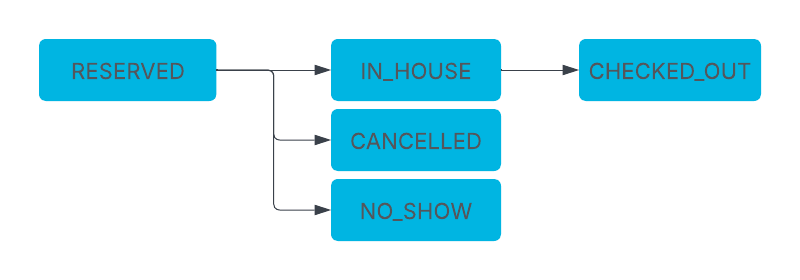
Non-Deducting Reservation Status
Some systems allow for a reservation to be created as “Reserved” and then changed to a non-deducting status. In this scenario, send a cancellation to IDeaS to remove the deducting reservation from IDeaS RMS data as a “sold”.
Personal Identifying Information (PII)
IDeaS does not request any Personal Identifying Information and expects that the sending system removes all PII data from reservation messages before sending.
Basic Reservations
Reservation yaml outlines the base requirements of all reservation messages submitted to IDeaS.
Day-Use Reservations
Following the Basic Reservation yaml, submit Day Use reservations to IDeaS with the same arrival and departure date.
Reservations on Pseudo Room Types / House Accounts
Reservations booked or moved to pseudo room types should be sent to IDeaS.
Booked vs Occupied Room Type Reporting
An important input into IDeaS RMS analytics is to track the original booked room type versus the occupied room type through the life of the reservation. The visibility in such a relationship is key to effective forecasting at the room type level and provides our Clients with enhanced RMS functionality referred to as Same-Time-Last-Year.
Following the synchronization of all reservations, IDeaS RMS will detect room type changes through the processing of incremental reservation updates. Supporting booked room type for both historical and future data is key to the enhanced forecasting and functionality.
Share Reservation Handling
What Is a Shared Reservation?
A shared reservation occurs when multiple guests share one room for overlapping stay dates while maintaining separate guest profiles or folios.
Key characteristics:
- At least one overlapping night
- Guests may arrive and depart on different dates
- Counts as one room sold per night
- Room revenue equals the sum of rates across all sharers
Why Correct Handling Matters
If shared reservations are not identified correctly:
- Room occupancy may be overstated
- Revenue forecasts may be inaccurate
- Availability and pricing decisions may be impacted
IDeaS RMS relies on proper share identification to normalize shared stays into one room occupancy record.
What the PMS / CRS Must Provide for Shares
1. Identify the Reservation as a Share
Each shared reservation must include:
- A standard reservation ID
- A shared-reservation reference linking all sharers together
These identifiers allow IDeaS RMS to recognize related records.
2. Designate a Primary Reservation
- One reservation must be marked as the Primary
- The Primary record becomes the consolidated reservation after share resolution
- Secondary records are used only for merging data (e.g., revenue)
3. Provide Guest Count Context
- Indicate whether guest counts are per room
- This ensures guest counts do not inflate room occupancy
Creating or Updating Shared Reservations
When a reservation:
- Is newly created as a share or
- Changes while part of a share
The PMS/CRS must send:
- The updated reservation and
- The full set of all related shared records
This allows IDeaS RMS to recalculate the shared stay correctly.
Breaking a Shared Reservation
Break Due to Change
If one guest leaves the share:
- The shared relationship is removed
- Remaining guests continue as a smaller share or standalone reservations
- Updated records must reflect the new structure
Break Due to Cancellation
Before cancelling a shared reservation:
- Convert it to a standalone reservation
- Then send the cancellation message
This prevents stale shared links in IDeaS RMS.
How IDeaS RMS Resolves Shares
Once received, IDeaS RMS:
- Groups all shared records
- Identifies the Primary record
- Creates one normalized reservation representing:
- Earliest arrival
- Latest departure
- One room per night
- Aggregated room revenue
Only the resolved reservation is used for forecasting and optimization.
Share Handling Partner Checklist ✅
Before integrating shared reservations, verify that your system:
- ✅ Flags shared reservations correctly
- ✅ Provides shared-reservation identifiers
- ✅ Designates a single Primary record
- ✅ Sends full share context with each update
- ✅ Removes share identifiers when a share is broken
Example of Reporting shareId where rate value is split:
| reservationId | shareId | Arrival | Depart | RoomType | Nightly Rate |
|---|---|---|---|---|---|
| 1234 | Share1 | 2025-12-20 | 2025-12-24 | BDDN | $50.00 |
| 1235 | Share1 | 2025-12-20 | 2025-12-24 | BDDN | $50.00 |
| 1236 | Share1 | 2025-12-20 | 2025-12-24 | BDDN | $50.00 |
| 1237 | Share1 | 2025-12-20 | 2025-12-24 | BDDN | $50.00 |
Example of reporting sharers where the rate value is on the primary reservation:
| reservationId | sharers | Arrival | Depart | RoomType | Nightly Rate |
|---|---|---|---|---|---|
| 1234 (primary) | 1235,1236,1237 | 2025-12-20 | 2025-12-24 | BDDN | $200.00 |
| 1235 | 1234,1236,1237 | 2025-12-20 | 2025-12-24 | BDDN | $0.00 |
| 1236 | 1234,1235,1237 | 2025-12-20 | 2025-12-24 | BDDN | $0.00 |
| 1237 | 1234,1235,1236 | 2025-12-20 | 2025-12-24 | BDDN | $0.00 |
Multi-Unit Reservation Handling
To ensure proper handling of multi-unit reservations, each reservation must be split into individual entries with unique IDs before or during check-in. Partner systems must integrate this functionality to avoid discrepancies in occupancy and inventory data across applications. Two options to report multi-unit reservations are outlined below. One option must be selected and inform IDeaS Integration Specialist.
Option 1: Sending System Divides into Individual Reservations Before Sending
The system separates multi-unit reservations into individual reservations in the backend, each with a unique reservation ID, using the initial reservation ID as a reference before sending them to IDeaS RMS. The numberOfRooms serves as the identifier for the number of rooms reserved under the initial reservation.
Example: Original multi-unit reservation created in PMS/CRS
| ReservationID | No Rms | Arrival | Departure | RoomTypeCode | RateCode | MarketSegment | BookingDate |
|---|---|---|---|---|---|---|---|
| 12345 | 5 | 2025-10-27 | 2025-10-31 | ADDN | BAR | RETAIL | 2025-04-11 |
The multi-unit reservation is divided before sending to IDeaS and keeps the reservationID of each reservation in PMS/CRS as separate reservations throughout its duration in the PMS. The reservation ID is used to maintain updates in IDeaS RMS and therefore cannot be changed.
| ReservationID | No Rms | Arrival | Departure | RoomTypeCode | RateCode | MarketSegment | BookingDate |
|---|---|---|---|---|---|---|---|
| 12345_1 | 1 | 2025-10-27 | 2025-10-31 | ADDN | BAR | RETAIL | 2025-04-11 |
| 12345_2 | 1 | 2025-10-27 | 2025-10-31 | ADDN | BAR | RETAIL | 2025-04-11 |
| 12345_3 | 1 | 2025-10-27 | 2025-10-31 | ADDN | BAR | RETAIL | 2025-04-11 |
| 12345_4 | 1 | 2025-10-27 | 2025-10-31 | ADDN | BAR | RETAIL | 2025-04-11 |
| 12345_5 | 1 | 2025-10-27 | 2025-10-31 | ADDN | BAR | RETAIL | 2025-04-11 |
Option 2: IDeaS RMS Divides into Individual Reservations
Sending system sends original multi-unit reservation with numberOfRooms representing the total rooms held. IDeaS RMS handles the split of the individual reservations, maintaining the individual reservations until updates received from the sending system.
Example: Multi-unit reservation created in Sending System and sent to IDeaS.
| ReservationID | No Rms | Arrival | Departure | RoomTypeCode | RateCode | MarketSegment | BookingDate |
|---|---|---|---|---|---|---|---|
| 12345 | 5 | 2025-10-27 | 2025-10-31 | ADDN | BAR | RETAIL | 2025-04-11 |
IDeaS employs the same split logic as outlined in Option 1, where multi-unit reservations are divided. The Sending System will also provide a unique ID for the multiReservationId in the reservation payload to IDeaS. The multiReservationId enables tracking and updates when multi-unit reservations in the Sending System are divided to update IDeaS RMS, where the new reservation IDs will replace the divided reservation IDs generated by IDeaS.
| ReservationID | multiReservationId | No Rms | Arrival | Departure | RoomTypeCode | RateCode | MarketSegment | BookingDate |
|---|---|---|---|---|---|---|---|---|
| 12345_1 | 12345 | 1 | 2025-10-27 | 2025-10-31 | ADDN | BAR | RETAIL | 2025-04-11 |
| 12345_2 | 12345 | 1 | 2025-10-27 | 2025-10-31 | ADDN | BAR | RETAIL | 2025-04-11 |
| 12345_3 | 12345 | 1 | 2025-10-27 | 2025-10-31 | ADDN | BAR | RETAIL | 2025-04-11 |
| 12345_4 | 12345 | 1 | 2025-10-27 | 2025-10-31 | ADDN | BAR | RETAIL | 2025-04-11 |
| 12345_5 | 12345 | 1 | 2025-10-27 | 2025-10-31 | ADDN | BAR | RETAIL | 2025-04-11 |
Example: PMS/CRS splits reservations and sends updates to IDeaS with PMS/CRS reservationIDs.
| ReservationID | multiReservationId | No Rms | Arrival | Departure | RoomTypeCode | RateCode | MarketSegment | BookingDate |
|---|---|---|---|---|---|---|---|---|
| 12345 | 12345 | 1 | 2025-10-27 | 2025-10-31 | ADDN | BAR | RETAIL | 2025-04-11 |
| 56505 | 12345 | 1 | 2025-10-27 | 2025-10-31 | ADDN | BAR | RETAIL | 2025-04-11 |
| 56506 | 12345 | 1 | 2025-10-27 | 2025-10-31 | ADDN | BAR | RETAIL | 2025-04-11 |
| 56507 | 12345 | 1 | 2025-10-27 | 2025-10-31 | ADDN | BAR | RETAIL | 2025-04-11 |
| 56508 | 12345 | 1 | 2025-10-27 | 2025-10-31 | ADDN | BAR | RETAIL | 2025-04-11 |
Expected Handling of Sending System for Dividing Reservations
The next action of dividing the multi-unit reservation in the Sending System is a modification to the original reservation. The change would be recorded in the value of the numberOfRooms, followed by the receipt of a new reservation record for the divided reservation created. A cancel message is only to be provided if there is a legitimate cancellation of the reservation record.
Original Reservation Reporting More than 1 Room Hold on Reservation:
-numberOfRooms changes from original room count to reduced room count.
-multiReservationId represents original reservation ID or another ID that doesn’t change and will connect all multi-unit reservations through the duration in the Sending System.
Divided Reservation(s) Handling:
- Each divided reservation gets sent with its own unique reservation ID.
numberOfRooms= 1 for each divided reservation.- Original booking date is applied to split reservation(s).
multiReservationIdrepresents original reservation ID or another ID that doesn’t change and will connect all multi-unit reservations through the duration in the Sending System.
Cancellation Before Multi-Unit Reservation is Divided
If only one of the original reservations are cancelled, this becomes a reduction in the numberOfRooms and a modified reservation should be submitted to IDeaS to keep data in sync.
Cancellation After Multi-Unit Reservation is Divided
If one of the reservations is cancelled after dividing a multi-unit reservation, submit a modified reservation to IDeaS for the cancelled reservation. Only the cancelled reservation message is required to be submitted to keep data aligned between IDeaS RMS and the Sending System. There is no specific condition governing which of the divided reservations should be cancelled, provided that the remaining reservations retain the multiReservationID.